The spreadsheet component for your app
Real Excel files.
Inside your app.
Give your users a spreadsheet they already know how to use, on the .xlsx files they already have. Formulas calculate in the browser, edits save to your backend, and the file goes back intact.
npm install gridpath"use client"; import { Spreadsheet, httpStore } from "gridpath"; // Saves to your API as the user works. // Leave it out to save in the browser. const store = httpStore({ url: "/api/books" }); export function Sheet({ id }: { id: string }) { return ( <div style={{ height: 600 }}> <Spreadsheet store={store} documentId={id} onError={(e) => toast(e.hint)} /> </div> ); }
The real component, not a recording
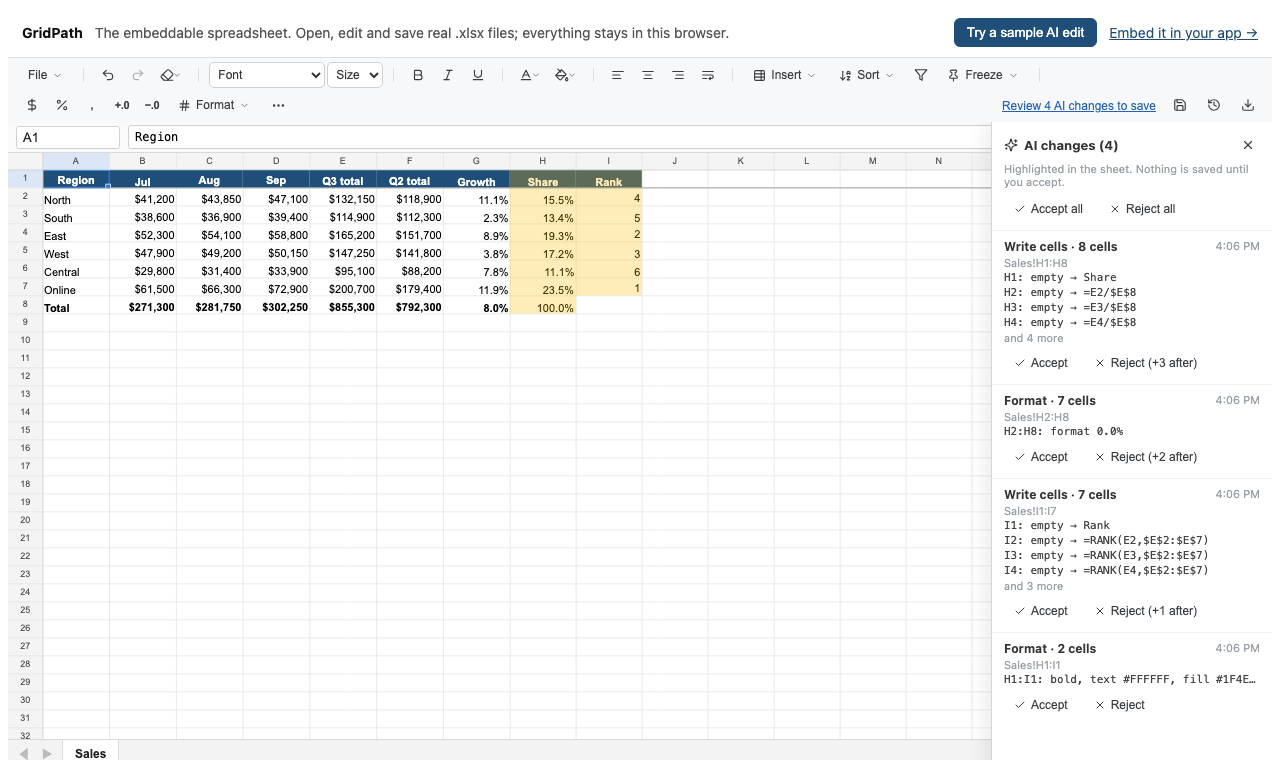
The engine runs in your browser. Open your own .xlsx in it: nothing is uploaded.
Keep the workbook.
A save patches the original .xlsx: the parts a session changed are rewritten, everything else is copied byte for byte. On a 1.4 MB analyst model, 75 of 76 parts came back identical. The other embeddable spreadsheets we measured dropped custom XML and printer settings, or most of the defined names.
Calculate in the browser.
A Rust engine, a fork of IronCalc, runs in a Web Worker: dynamic arrays, LET and LAMBDA, XLOOKUP, the IFS family. A 55,000-formula model recalculates in 0.8 s; one with 2.3 million cells opens in 4 s. Formulas it can't calculate keep Excel's value, and say so.
What it calculates →Choose where edits go.
Autosave to the browser, or to your backend with httpStore. The status says which: "Saved to your account". If your backend is down, edits wait in the browser ("Saved in this browser only") and the save retries.
From demo to your app
Start small. Make it yours.
Embed the spreadsheet first. Add your backend and an AI agent when you need them; each is a separate step.
- 1Embed. Toolbar, autosave in the browser, version history and Download come with it.
- 2Save to your backend. Point
httpStoreat your API; failed saves retry and nothing is lost. - 3Add AI. Your model and key on your server; the user accepts or rejects every change.
"use client";
import { Spreadsheet } from "gridpath";

export function Sheet({ file }: { file?: ArrayBuffer }) {
  return (
    <div style={{ height: 600 }}>
      <Spreadsheet file={file} fileName="Budget.xlsx" />
    </div>
  );
}
That's a working spreadsheet with a toolbar, autosave and version history. Problems arrive at onError with a code and a hint you can show: a CSV gets "a text file, not an .xlsx workbook", not a blank grid.
import { Spreadsheet, httpStore } from "gridpath";

const store = httpStore({
  url: "/api/books",
  // Called before every request; leave it out with cookie sessions.
  headers: async () => ({ Authorization: `Bearer ${await getToken()}` }),
});

<Spreadsheet store={store} documentId={book.id} />

// Your API: PUT and GET /api/books/{id}, GET /api/books,
// GET /api/books/{id}/versions. The Next.js example has the routes.
The status says where edits are. While your backend can't be reached, they wait in the browser and the save retries; if the tab closes first, they reopen next time. The REST contract
import Anthropic from "@anthropic-ai/sdk";
import { AGENT_INSTRUCTIONS, agentTools } from "gridpath/agent";

export async function POST(req: Request) {
  const { messages } = await req.json();
  const reply = await new Anthropic().messages.create({
    model: "claude-opus-5-5",
    max_tokens: 16000,
    system: AGENT_INSTRUCTIONS,
    tools: agentTools(),
    messages,
  });
  return Response.json(reply);
}
// In the browser: run each tool call with sheet.ai.run(name, input).
Your model and your key, on your server; GridPath never sees either, or the file. The agent's edits land highlighted and nothing is saved until the user accepts them. The browser loop is twenty lines
Measured
Against the spreadsheets you'd embed otherwise.
Two real models, opened, recalculated, edited and saved in Chromium by each component.
| GridPath | SpreadJS 19.2 | Handsontable 18.1 + HyperFormula 3.5 + ExcelJS 4.4 | |
|---|---|---|---|
| 1.4 MB analyst model: open, fully recalculated | 0.6 s, 0.8 s | 1.5 s, 3.6 s | 1.9 s |
| … agrees with Excel's results | 95.5% | 94.0% | 56.9% |
| … lost on save | Nothing (75 of 76 parts byte-identical) | Custom XML, printer settings | Custom XML, printer settings, comments, 3,335 of 3,418 names |
| Model over 10 MB with 2.3M cells: open, fully recalculated | 4.2 s, 10.9 s | Tab crashes (lazy mode: 6.5 s, 3.7 min) | 10.8 min |
| … edit → dependent updated | 2.7 s | Lazy mode crashes on the first edit | 64 s |
Measured on an M2 Pro. We wrote the benchmark, so check it: method, harness and full results. The two models are private; the harness runs on your own copies.
Confidence before commitment
Test the files your users rely on.
Keeping a file, calculating it and drawing it are different promises. The demo checks each against your own workbook: what it carries, how long it took to calculate, and, after you edit it, which parts a save rewrote.
What does a save keep?
Every part of the file the session didn't touch comes back byte for byte: charts, pivot tables, VBA macros, images, custom XML, defined names, printer settings. The parts with the cells, formats, rows and sheets the session changed are rewritten, and formulas the edits recalculated carry their new results so readers that don't calculate see current numbers.
What isn't supported yet?
Charts are kept in the file but not drawn in the grid. There are no data-validation dropdowns and no real-time collaboration yet. Not every Excel function is implemented: a formula GridPath can't calculate (an add-in call, an unsupported function, a link to another workbook) keeps the value Excel saved, the toolbar counts them, and getCell says why.
Does the file leave the browser?
Not in the demo: it opens, calculates and saves in your browser and stores your edits there. In your app the file goes where your store sends it, usually your own API; GridPath runs no server for it.
How were the numbers measured?
In Chromium on an M2 Pro, opening each workbook in each component, recalculating, editing one input and saving; fidelity is a part-by-part comparison with the original file and agreement is against Excel's cached results. The harness is in eval/embed-bench; point it at your own files.
Is it open source?
The engine, the in-place saver and the gridpath package (this component and an MCP server for coding agents) are Apache-2.0. GridPath's desktop app, in the same repository, is source-available under FSL-1.1; each release becomes Apache-2.0 two years after it ships.
Bring your workbook.
The demo opens it in your browser, shows what it carries and how long it took to calculate, and checks what a save keeps.